What’s new
Every release, in the order it shipped.
September 20th, 2026
💬 Message One Person, or a Few
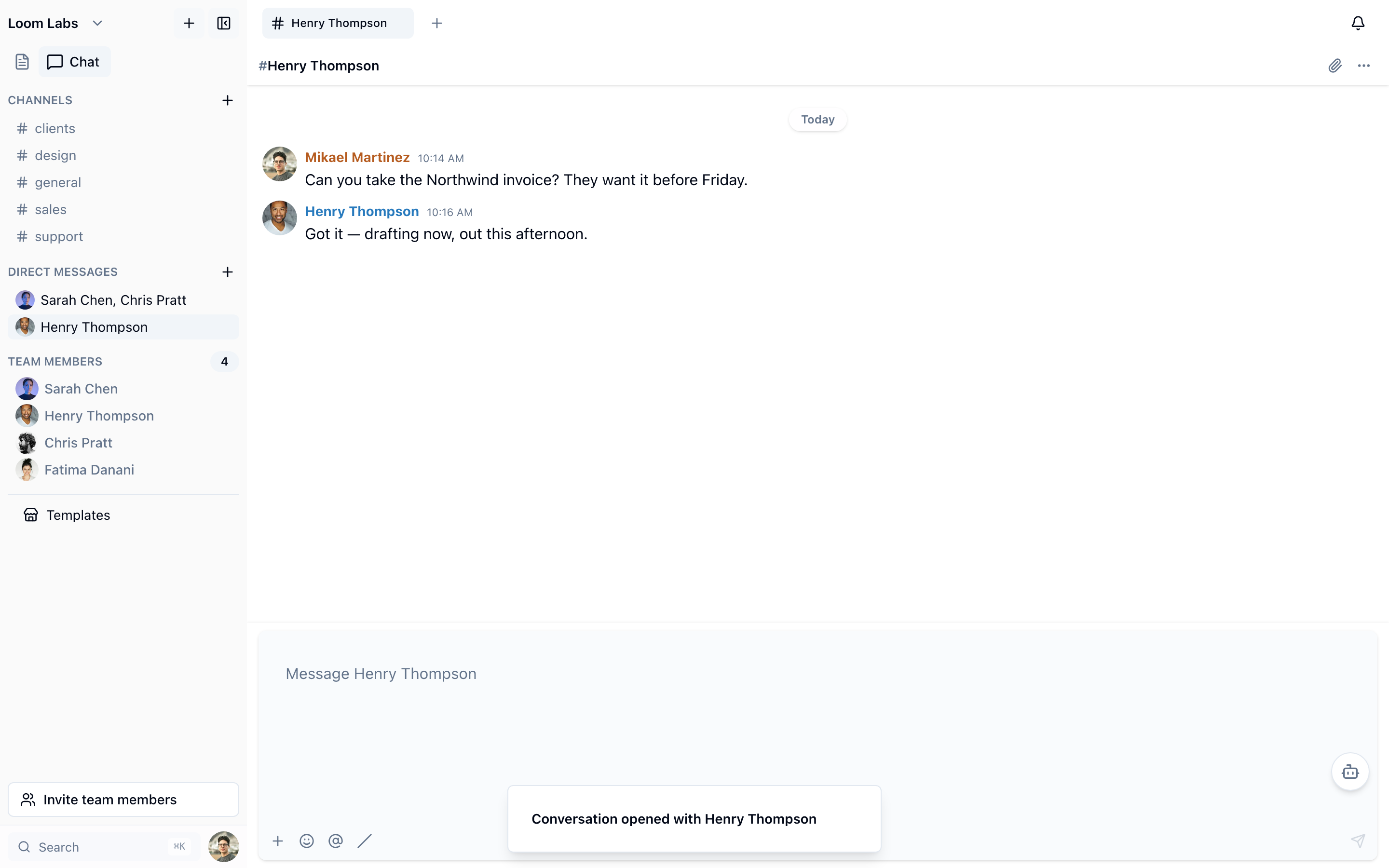
Not everything belongs in a channel. Press the plus beside Direct Messages, pick somebody, and you have a private conversation with them; pick two or more and you have a group, named after whoever is in it unless you name it yourself. A one-to-one is identified by who is in it and nothing else, so opening one with the same person tomorrow lands you back in the thread you already have rather than beside it. A group is not deduplicated, because the same people can have one conversation about a client and another about a launch.
Key Benefits
- The Quiet Half of the Work: the question you would rather not ask in front of the whole workspace now has somewhere to go, in the same place the rest of the work lives
- One Thread Per Person: asking twice opens the conversation you already have, so a week of quick questions is one history instead of five empty threads
- A Group Names Itself: two people picked, and the conversation is called after them — or give it a name, and have a second group with the same people for something else
🧹 Fixes and Improvements
The command line now answers for private pages the way the app always has: a colleague's private page, the databases under it and their rows are no longer readable, editable or trashable through a workspace member's token. Elsewhere in chat, Browse channels lists the public channels you have not joined and Join now takes you into one, rather than quietly writing the membership and standing still; and a conversation no longer appears under Channels as well as Direct Messages. The search box in Trash filters what it shows, a database no longer lists itself as the first row of itself over the API and the CLI, and the first person to open the app after a deploy no longer waits on a connection the server can open in advance. Nothing here needs anything from you.
September 16th, 2026
🔔 Your Cards Tell People
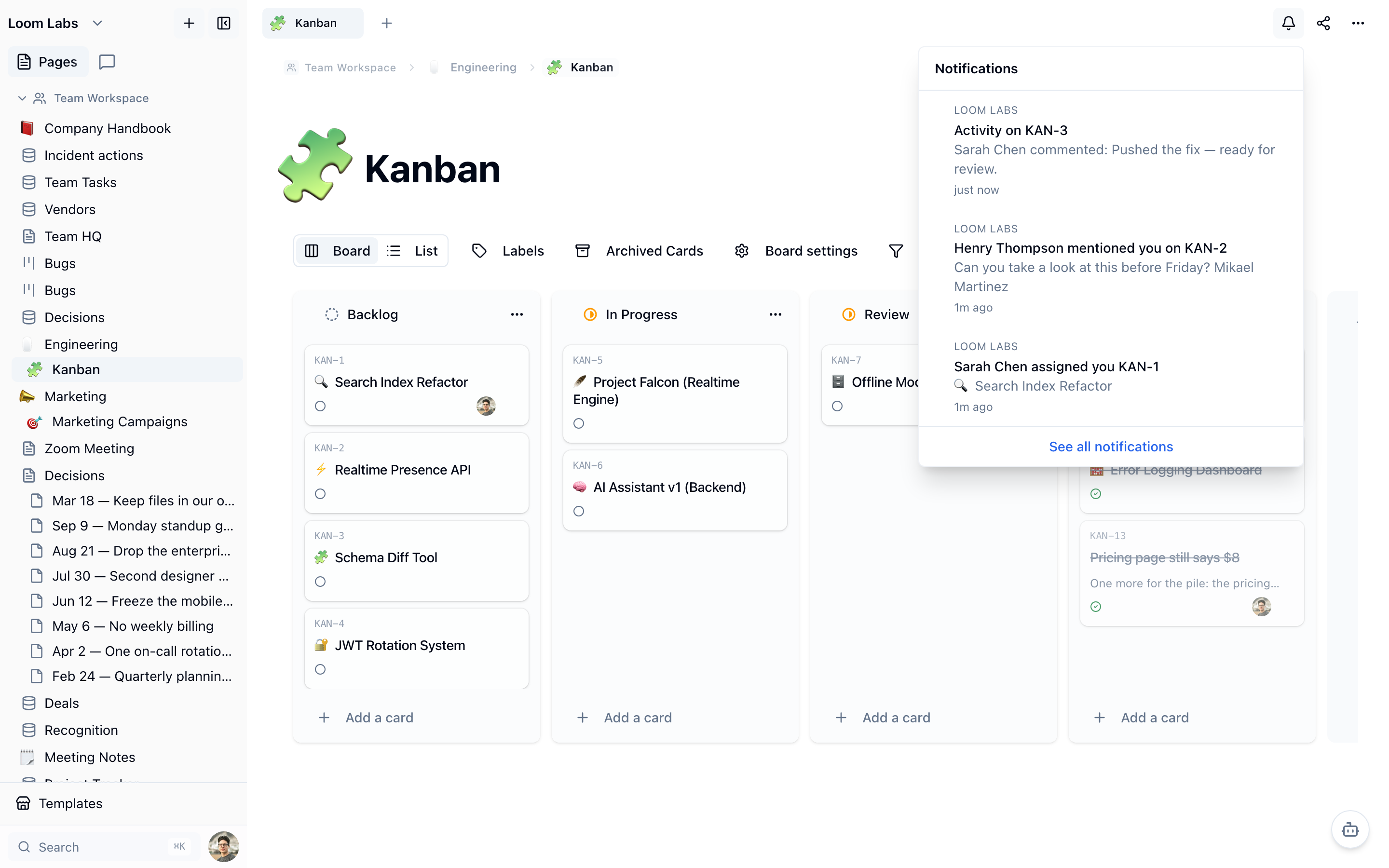
Assign a card, @mention someone in its description or a comment, and they hear about it. The bell now carries card activity: being assigned, being named, and anything that happens on a card you are watching. Creating a card or being assigned one starts you watching it automatically, opening a card marks its activity read, and you are never notified about your own edits. If two things would reach the same person at once, they get the strongest reason rather than three rows — being assigned beats being mentioned beats watching.
Key Benefits
- The Assignee Finds Out: a board that tracks work is only as good as the person who was given it knowing, and now they are told the moment it happens
- Watch Anything You Care About: watch a card you are not assigned and its comments and moves reach you, without anyone having to remember to loop you in
- Nothing You Cannot Open: a notification only ever names a card you already have access to, so a private board's titles never surface through the bell
💬 Turn a Message Into a Card
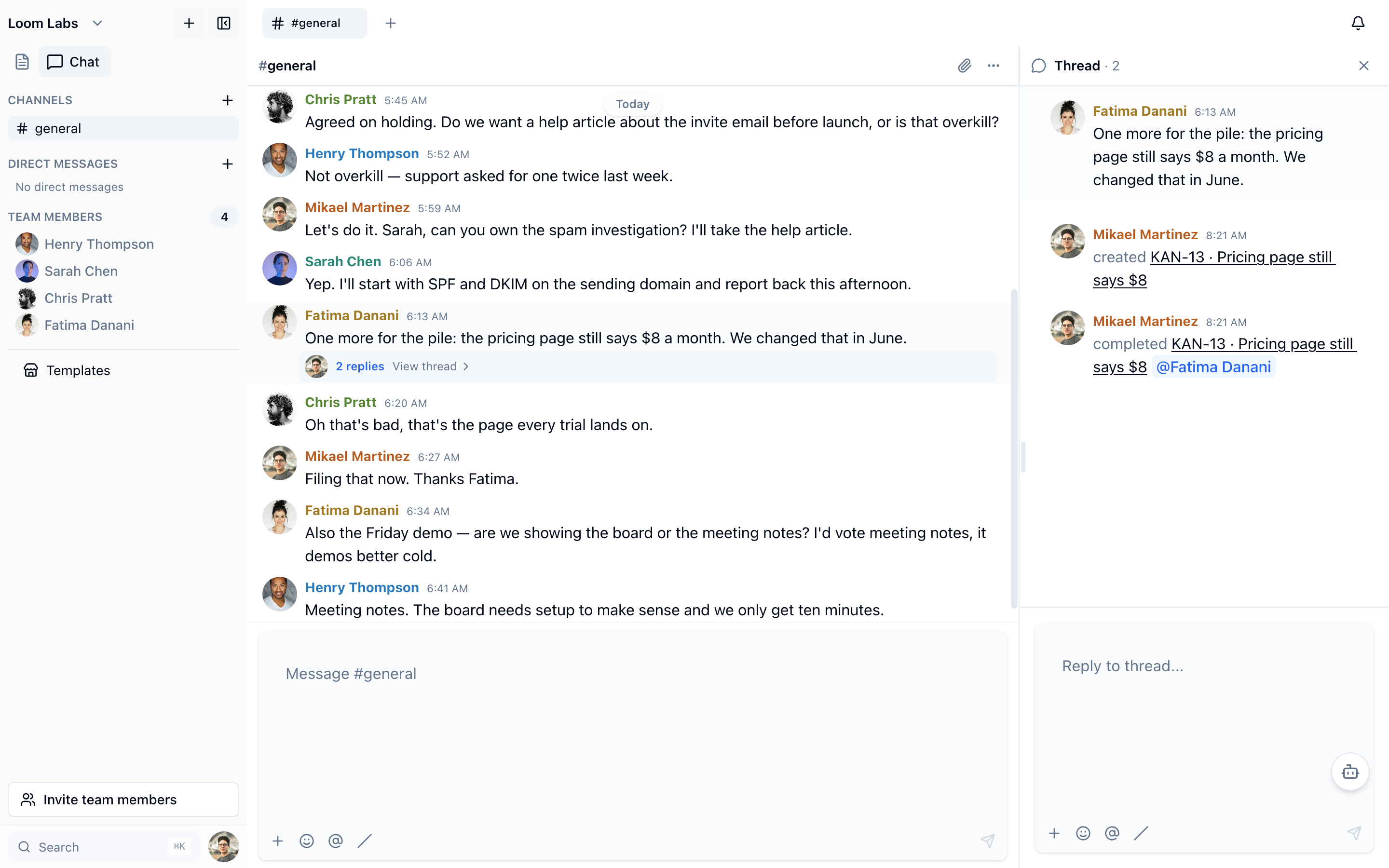
Someone reports a problem in a channel and it scrolls away. Create a card straight from the message instead: the card takes the message as its description, remembers where it came from, and posts one line back into the thread saying so. When the card is finished, the thread hears that too — so the people who raised it find out it is done without going to look. Creating a card twice from the same message gives you the card that already exists rather than a duplicate.
Key Benefits
- The Channel Learns the Ending: the thread is told when the card is created and again when it is completed, so a bug reported in chat stops disappearing into a board nobody in that channel watches
- No Retyping: the message becomes the card's description as written, with a link back to the conversation it came from
- Said Once, Filed Once: a second attempt on the same message returns the existing card, so two people reacting to the same report do not create two
🔗 Name a Card in Any Page
Type [[ in a page and pick a card, and you get a live chip instead of text: its ticket, its title and its current status, drawn from the card itself. Plain text goes stale the moment a card moves column or board — a chip does not, and it survives a move to another board because it follows the card's current ticket. You can search for the card by its ticket typed whole, or by its title. The same [[ picker works inside cards, so a card can point at a page or at another card.
Key Benefits
- A Plan That Stays True: a spec that names six cards keeps showing their real status months later, instead of a list of titles that quietly stopped matching
- Find It By Its Ticket: type BUG-48 and get that card, from anywhere the picker appears
- Still Only What You Can See: a card on a board you cannot open shows as unavailable and gives nothing away — not its title, and not whether it exists
🤖 Action Items That Are Real Tasks
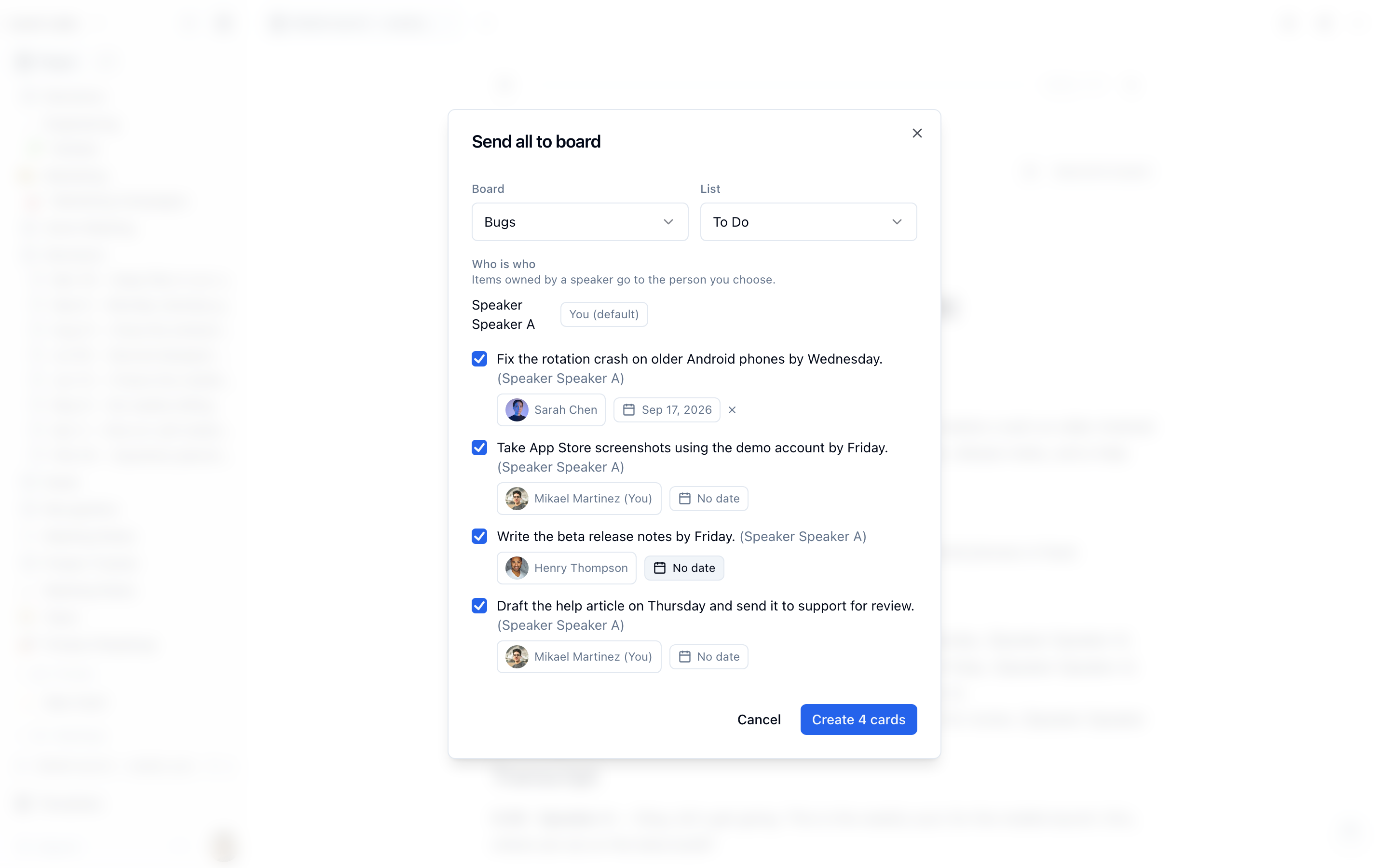
Meeting notes already turned action items into cards. Now they become tasks somebody owns: the dialog maps each speaker to a member, so it can suggest who an item belongs to, and you set an assignee and a due date per item before sending. Each card links back to the meeting it came from, and each sent item shows a live chip on the note with the card's current state. Finish the card and the checkbox in the notes ticks itself, so the page stops claiming work is outstanding after it is done.
Key Benefits
- Somebody Owns It: an owner and a date on each item as you send it, instead of a pile of cards assigned to whoever clicked the button
- The Note Stops Lying: completing the card ticks the item in the meeting notes, so a note read two weeks later still describes what is true
- Both Directions Home: the card links back to the meeting and the meeting shows the card's status, so neither one is a dead end
🔎 Search Your Chat, Not Just Your Pages
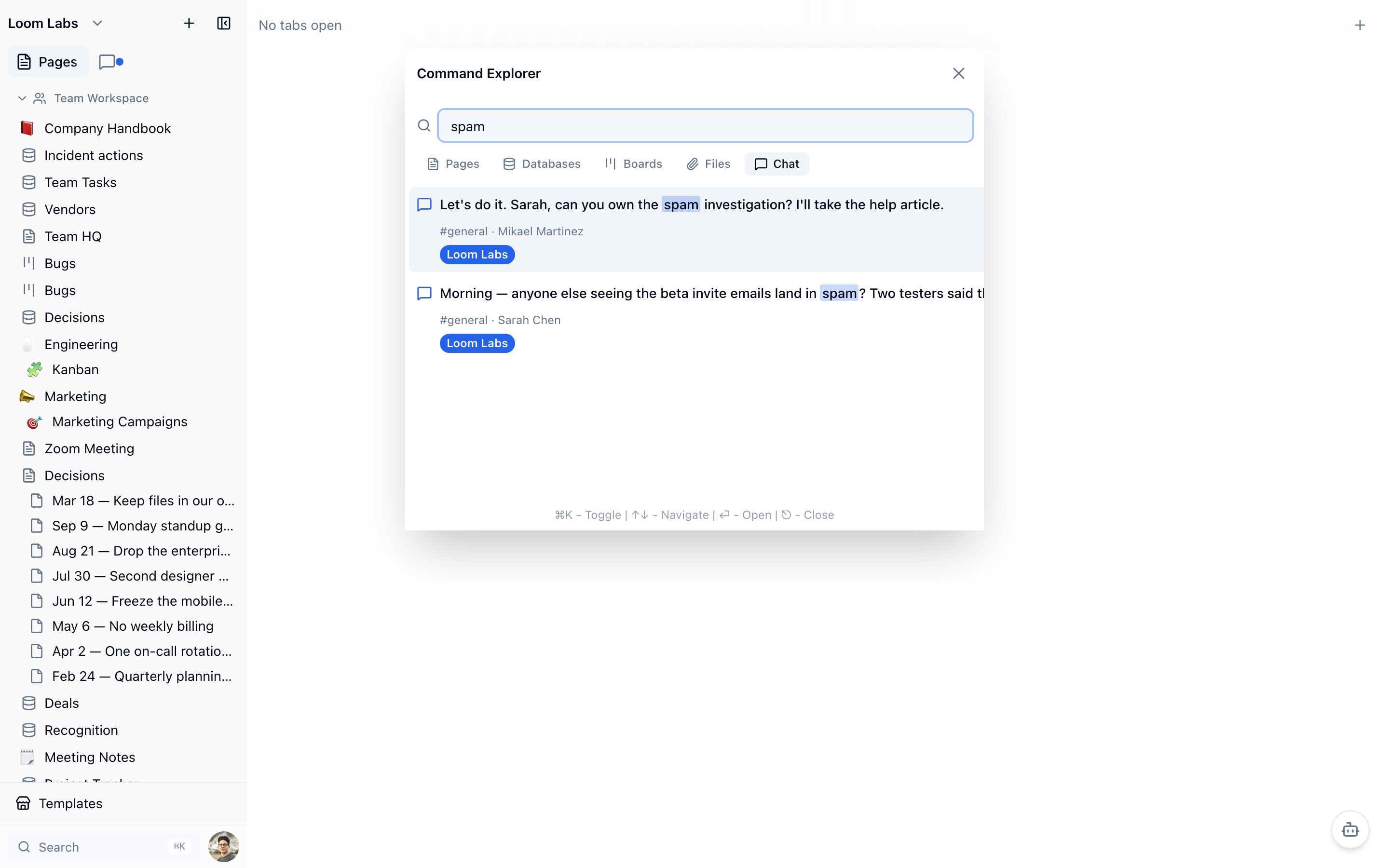
Search already read the body of every page, every database row, board card and file. Now it reads your messages too. Open search, pick Chat, and type a few words from something you remember somebody saying — half a word is enough, since each term matches as a prefix. Results show the message, who sent it and which channel it was in, and opening one takes you to the channel rather than somewhere that cannot load. Only channels and DMs you are a member of are ever searched.
Key Benefits
- The Thing Somebody Said: a decision made in a channel three months ago is findable by the words it was made in, not by remembering the day it happened
- Half a Word Will Do: each term matches as a prefix, so a name you can only partly spell still finds the message
- Your Channels Only: a DM or a private channel you are not in cannot appear, because search asks the same membership question the channel list does
🧹 Fixes and Improvements
A long pass over who can see what: page, card and file access now asks what you are allowed to open rather than only which workspace you belong to, and that rule is applied the same way by the app, the shared-page links and the lh CLI. Invitations behave: an expired invite can be re-sent instead of blocking that address forever, workspace owners get a pending-invitations list they can resend or revoke from, and signing in with Apple or Microsoft no longer loses the invitation you arrived with — you land in the workspace you were invited to. Elsewhere: list view works properly on a phone, clicking a row opens the card, editing a message to add an @mention now notifies the person you added, opening a page no longer counts as editing it, monthly AI credits are granted as they should be, and our pricing page says the right price. Nothing here needs anything from you.
September 14th, 2026
✨ Boards Are Now an Issue Tracker
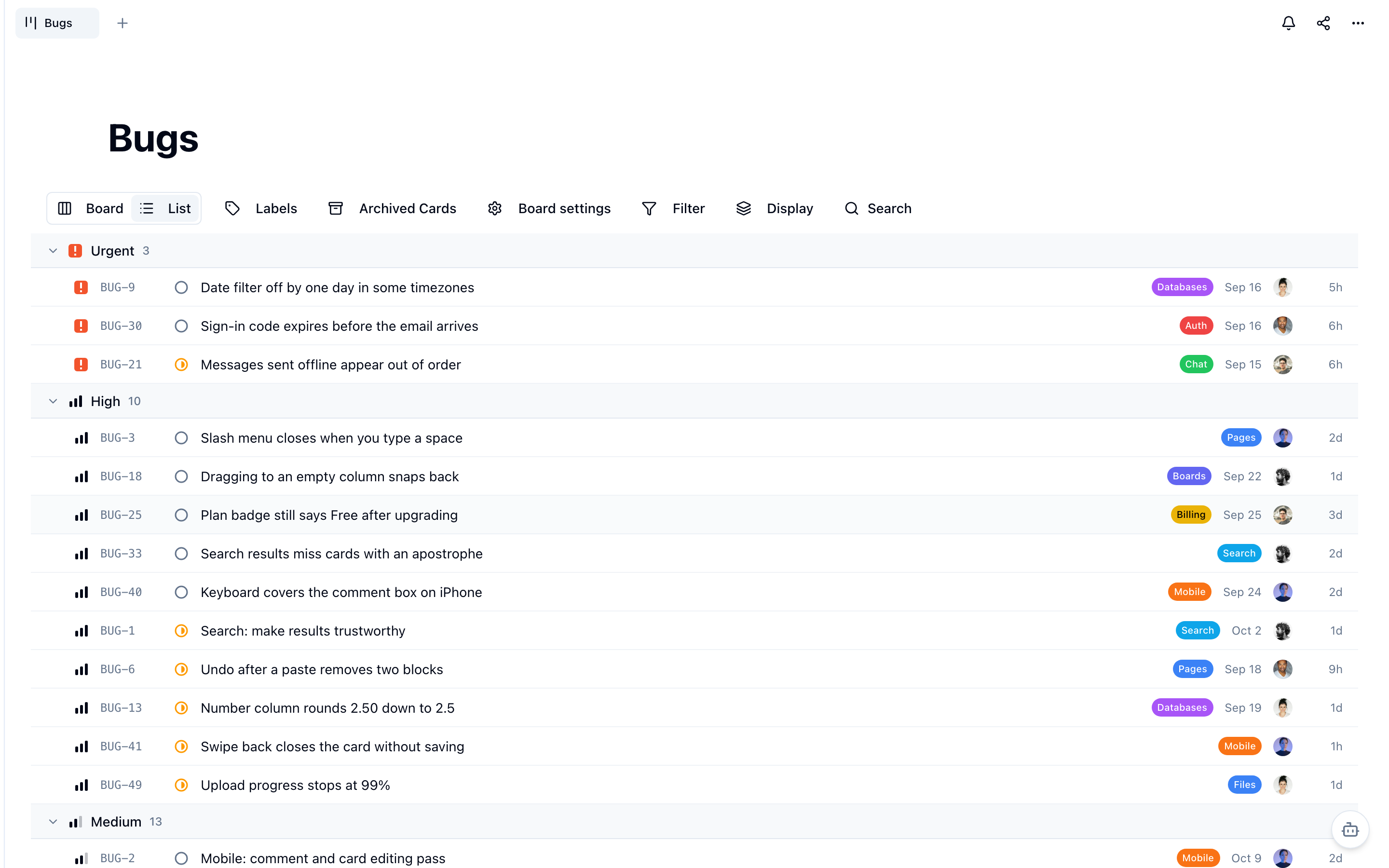
A board can now tell you what matters, not just where things are. Every card has a priority — Urgent, High, Medium, Low or No priority — set from a picker in the card's header, and every column is a status — Backlog, Todo, In progress, Done or Canceled — with its glyph in the column header. Drag a card into Done and it is completed; drag it out and it reopens. The areas teams used to keep as extra columns become coloured labels on the card, so a board can stay three columns wide and still say what each card is about. And when the board gets long, switch the toolbar from Board to List: every card becomes one dense row with its priority, ticket number, status, title, labels, due date, assignee and last update, grouped by status, priority, label, assignee or epic.
Key Benefits
- Urgent Comes First: group the list by priority and the urgent cards sit on top with a count on every group, or filter any board by priority or label
- Change Many Cards at Once: cmd-click or shift-click rows, then set priority, status, a label or an assignee, or archive them, from one bar
- Your View Stays Yours: Board or List is remembered for each person on each board, and a kanban keeps its manual order unless you choose to sort it by priority
- Scriptable From the Terminal: the lh CLI sets a card's priority, adds and removes labels by name, archives cards and comments on them
🎨 Eight Editor Themes You Already Know
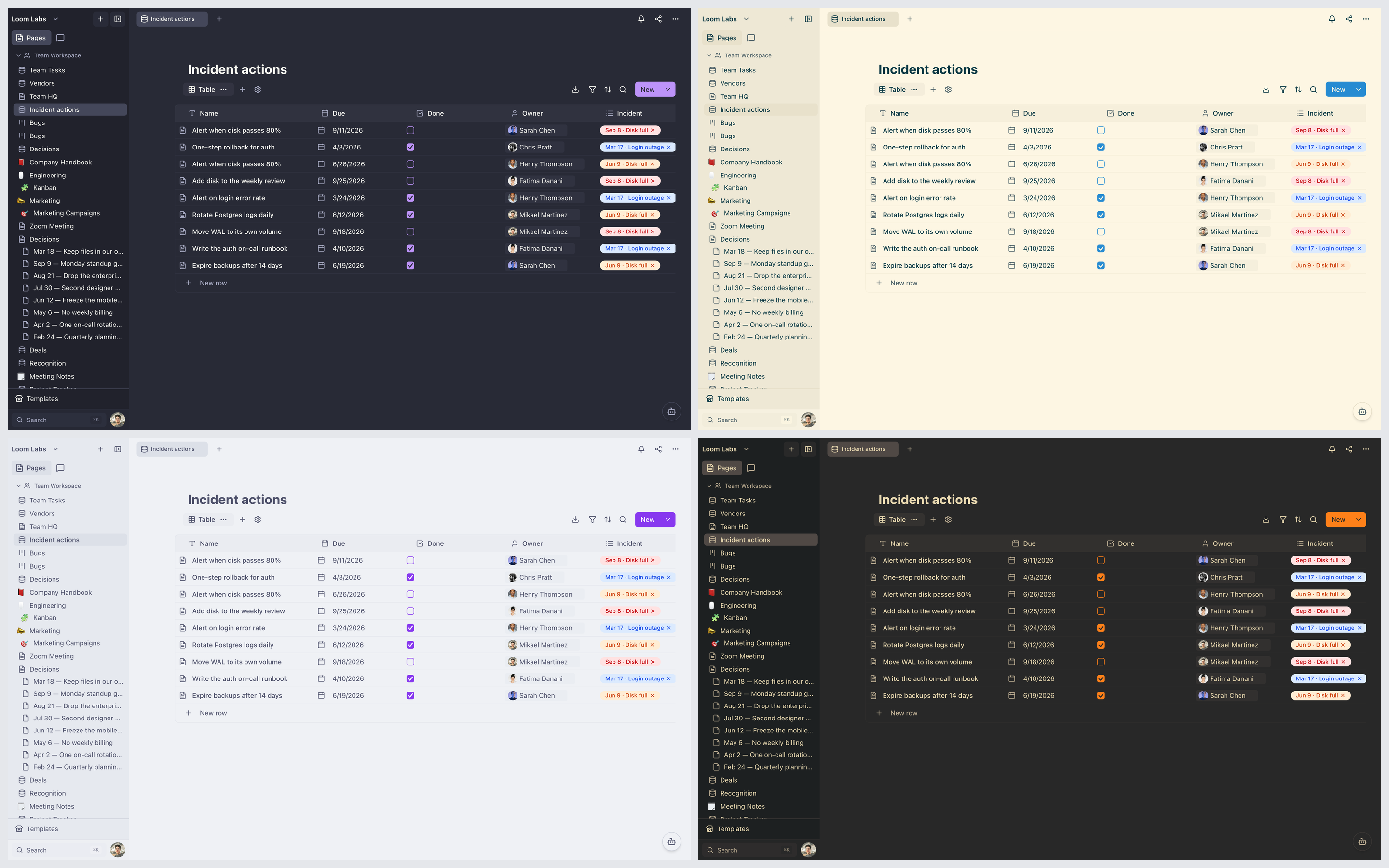
The theme picker now carries the palettes people ask for by name: Dracula, Nord, Catppuccin Mocha and Gruvbox Dark on the dark side, and Solarized Light, Catppuccin Latte, Rosé Pine Dawn and GitHub Light on the light. That makes 26 themes, 14 dark and 12 light. Open your avatar menu, choose Theme, and the whole app repaints at once, so LumifyHub can look like the editor you spend the rest of your day in.
Key Benefits
- One Look Across Your Tools: match LumifyHub to the colours your editor and terminal already use, so switching windows stops being a jolt
- Room for Both Moods: four new dark themes and four new light ones, each chosen from the same picker and switched in a click
- High Contrast Still Applies: turn contrast to High on any of the new themes and text, borders and focus outlines strengthen while the theme keeps its accent colour
🧹 Fixes and Improvements
A round of fixes across meeting notes, databases and the command line, including stricter permission checks on who can change a database and what the CLI can reach. Nothing here needs anything from you.
September 13th, 2026
🤖 AI Meeting Notes
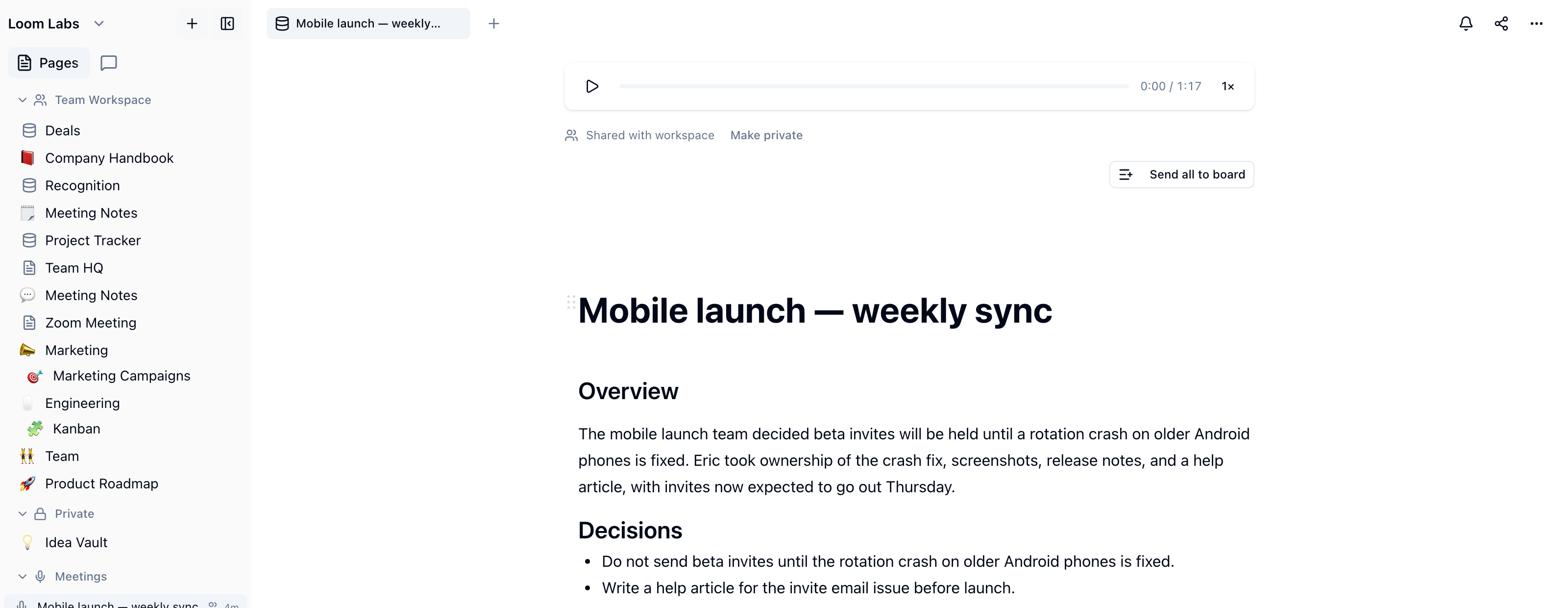
On paid plans, you can now record a meeting straight from LumifyHub and get the notes written for you. Start one from the Meetings section of the sidebar, choose just your microphone or your microphone plus the call's browser tab, and when you stop, the recording becomes a page: an overview, the decisions that were made, the action items as checkboxes, and a timestamped transcript that tells each speaker apart. Nobody has to take notes while also trying to take part, and the notes land in the workspace where the work already lives instead of in another tool.
Key Benefits
- Action Items Become Cards: pick a board and a list, tick the items you want, and each one becomes a card — items already sent are skipped, so sending twice creates nothing twice
- Private Until You Share It: every note starts visible only to you, so a 1:1 or an interview never becomes workspace-readable by default, and sharing is one click when you want it
- Nothing Gets Lost: the recording uploads as you go and is kept even if processing fails, so a note can be retried rather than re-recorded
September 12th, 2026
📅 See a Database as a Calendar
Any database with a date on it can now be read as a month. Pick the date property once and the rows arrange themselves across the grid, so a content schedule, a release plan or a list of renewals stops being a column of dates you have to hold in your head and becomes the shape of the month. Drag a card onto another day and the date changes with it — the same row, the same data, moved rather than re-entered.
Key Benefits
- Rescheduling Is a Drag: move a card to a new day and the date property updates, with no cell to find and no calendar picker to open
- One Set of Rows: the calendar is a view of the database you already have, so nothing is copied and every other view stays in step
- Nothing to Set Up: if the database has no date yet, the empty calendar offers to add one rather than sending you off to the table
📊 Chart a Database Without Leaving It
A database can now be charted where it lives. Choose the property to group by and how to count — count all, count values, count unique, count empty, count filled, sum, average, min or max — and the rows come back as a bar chart. It is the answer to the questions people usually export a table to a spreadsheet to get: how many per owner, how much per client, the average per month.
Key Benefits
- No Export Step: the chart reads the same rows as the table, so there is nothing to keep in sync and nothing to re-export when the data changes
- Nine Ways to Count: from a plain count to a sum, an average or a min and max over a number property
- It Costs Nothing to Skip: the charting code only downloads for people who actually open a chart, so nobody else's workspace gets slower
🏷️ Rename a Board's Ticket Prefix
Boards give every card a ticket — BUG-14, ROA-3 — and the prefix is now yours to change from the board's own settings. Rename it and every card on that board shows the new prefix straight away, including the ones created months ago, because the ticket is read from the board rather than stamped onto each card. Useful when a board outgrows the name it was created under, which is most boards eventually.
Key Benefits
- Old Cards Come With You: existing tickets take the new prefix immediately — there is no migration and no split history
- No Collisions: a prefix already in use elsewhere in the workspace is refused, and the message names the board holding it
- Hard to Do by Accident: changing the prefix needs manage permission on the board, and an empty value is rejected rather than quietly replaced
🧹 Fixes and Improvements
Images across the site are served from a shared cache now instead of being re-encoded by whichever server answered, so pages carrying screenshots load noticeably faster. This release notes page and the blog also boot properly again, and the file-quota line in a card now shows your real numbers rather than a blank. Nothing here needs anything from you.
September 8th, 2026
🗑️ Trash Takes the Whole Page With It
Trashing a page now takes everything under it — child pages, the rows of a database, the boards and whiteboards behind them — in one move, and restoring it brings back exactly what went in. Before, only the page you clicked was trashed and its children stayed live with nothing in any sidebar pointing at them. The page also gives its address back the moment it goes, so the short, obvious URL is free for the page that deserves it.
Key Benefits
- Nothing Left Stranded: a page's children go with it instead of surviving as orphans nobody can find
- Restore Means Restore: what went together comes back together, and a page you restored on its own stays where you put it
- The Address Comes Back: a trashed page no longer holds its URL forever, so the name is yours to reuse
🔒 Private Pages Are Back
The sidebar has its Private section again, on desktop and mobile: create a page straight into it, or drag one across when it stops being everyone's business. It came back with team workspaces, and this time the boundary is real rather than a label — moving a page under a private parent makes it private, moving it out makes it shared, and everything underneath follows in both directions.
Key Benefits
- Privacy Follows the Move: a page dropped under a private parent becomes private, along with everything beneath it
- Only Yours to Hide: a page can only be made private by the person who wrote it, so nobody can hide your work from you
- Both Trees: the split is in the mobile page tree as well, not only the desktop sidebar
🧹 Fixes and Improvements
A round of smaller fixes across pages, chat and databases, and a substantial speed-up for the public parts of LumifyHub — a shared page and the marketing site now send a fraction of the code they used to. Nothing here needs anything from you.
September 3rd, 2026
⌨️ Vim Mode
Turn on modal editing for any page and edit with the keys you already know — motions, operators, visual mode, and a real : command line with substitute. It is a page setting, so you can keep it on for the documents you live in and off for the ones you share, or set it as the default for every new page from your account settings.
Key Benefits
- Nothing New to Learn: hjkl, dd, ciw, yank and put behave the way they do in your editor, inside a rich document
- See Before You Replace: :s shows you exactly what it would change while you are still typing the pattern
- Per Page or Everywhere: a page-level setting with an account-wide default, so you decide where modal editing applies
🔎 Search That Reads Your Pages, Not Just Their Titles
Search now looks inside the body of every page you can reach and shows you the line the match is on, so you can tell the right result from the near-miss without opening four tabs. It runs across pages, databases, boards and files from the same box.
Key Benefits
- Find the Sentence, Not the Page: every result carries the line your words actually appear on
- Fast on a Full Workspace: body matching runs against an indexed column, so a large workspace answers as quickly as a small one
- One Box, Four Kinds of Thing: pages, databases, boards and files are tabs in the same search, not four places to look
🕰️ Version History Is Never Trimmed
Every version LumifyHub saves of a page is kept, forever. The old hundred-snapshot cap deleted your oldest versions first — which are exactly the ones worth having on a document you have edited for a year — and it did it silently. That cap is gone, and so is the limit on how far back the history list would show you.
Key Benefits
- The Oldest Draft Survives: the version from a year ago is still there, and it is the one you cannot reconstruct
- History You Can Actually Reach: the list no longer stops at the most recent fifty entries
- Still Readable: versions are spaced rather than saved on every keystroke, so history is a list of real changes
🎨 Make a Page Read the Way You Want
Choose from seven typefaces, set the text size, and switch a page into code mode with markdown syntax colouring — per page, or as the default every new page inherits. Set it once in your account and override it on the one document that needs to be different.
Key Benefits
- Defaults That Stick: set your typeface and size once and every new page starts there
- Override Where It Matters: a single page can break the rule without changing anything else
- Reset Is Honest: clearing a page's overrides now clears all of them, including the typeface
📋 Paste Anything In, Take Markdown Out
Paste a formatted document — a reference sheet, a spec, an AI-generated artifact — and it arrives as real editor blocks instead of a run of collapsed paragraphs. Definition lists become tables, section wrappers are unwrapped, and headings, code, links and images survive. Going the other way, any page can be copied out as Markdown from the page menu.
Key Benefits
- Structure Survives the Paste: tables stay tables and headings stay headings, rather than flattening into prose
- Copy as Markdown: take a page into a commit message, an issue or another tool without reformatting it by hand
- No Cleanup Pass: the shapes the editor cannot store are rewritten into ones it can, before anything is dropped
🔗 Page Links You Can Read
Page URLs now carry the page's name instead of a string of random characters, so a link you paste into a message tells the person receiving it where it goes. Old links keep working — renaming a page does not break the URL anyone already has.
Key Benefits
- A Link That Explains Itself: the address says which page it is before anyone clicks it
- Renames Are Safe: previous slugs keep resolving, so shared links do not rot
- Better Sharing: a readable URL survives being pasted into chat, a ticket, or an email
🔑 Personal Access Tokens for the Command Line
Mint an access token from your account settings and drive LumifyHub from your terminal — pages, databases and rows as before, and now boards, lists and cards too. Tokens are yours, shown once, and revocable from the same screen.
Key Benefits
- Scripts Instead of Clicks: automate the workspace chores you currently do by hand
- Boards From the Terminal: lists and cards are reachable now, not just pages and databases
- Revoke in One Click: a token you no longer trust stops working from the screen that made it
💳 Manage Your Own Subscription
Billing now has its own page, with your plan, your seats and your renewal date on it, and a direct route into Stripe's customer portal for payment methods, invoices and receipts. Nothing about changing your plan requires emailing us.
Key Benefits
- Invoices Without Asking: download any past receipt yourself, whenever finance needs it
- Change a Card in Place: payment details are updated through Stripe, so we never hold them
- See What You Are Paying For: plan, seats and renewal date on one screen
July 31st, 2026
👁️ High Contrast, on Any Theme You Like
Text, borders and focus outlines can now be rendered at much higher contrast, and it is a separate switch from the theme you have chosen — so you keep your colours and get the legibility. Leave it on Auto and LumifyHub follows whatever your operating system already asks for.
Key Benefits
- Not a Nineteenth Theme: contrast is its own axis, so all eighteen themes can be rendered high contrast
- It Already Knows: Auto follows your system's contrast setting, so it is on before you find the switch
- Three States, Not Two: auto, high, or off — you can override your system rather than only obey it
💬 Fix a Message You Already Sent
Messages can be edited, deleted and copied from a hover menu or a right-click, so a typo in a channel is a five-second fix instead of a follow-up message correcting yourself. Each action has its own rule about who may do it, and the server checks again rather than trusting the menu.
Key Benefits
- Edit Instead of Apologise: correct the message everyone is reading, not the one underneath it
- Delete Is Author or Moderator: you can remove your own, and the people who run the channel can remove anyone's
- Right-Click Works: the same actions are on hover and on the context menu, whichever you reach for
⌨️ Select the Block, Then the Page
Cmd+A in a document now selects the block you are in first, and only selects the whole page if you press it again — so selecting one paragraph no longer means selecting everything and starting over. The blocks it selects are highlighted as they are picked up.
Key Benefits
- Two Presses, Two Scopes: the block you meant, then the page you meant
- You Can See What You Have: selected blocks are highlighted rather than left to guess at
- Fewer Accidents: no more replacing an entire document because Cmd+A did what it always did
July 29th, 2026
🪪 Sign In with Microsoft and Apple
You can now sign in to LumifyHub using your Microsoft or Apple accounts, making it quicker and easier to get started or switch devices.
Key Benefits
- Faster Onboarding: Join your workspace in seconds with single sign-on
- Fewer Passwords: Reduce login friction and password fatigue
- Smooth Team Access: Effortlessly invite teammates who use Microsoft or Apple
- Cross-Device Convenience: Instantly log in on any device with your preferred account
🤖 AI Mentions & Assistant Drawer Improvements
The LumifyHub AI Assistant now understands and responds to @mentions of pages and people in both chat and the assistant drawer, making collaboration with AI smarter and more intuitive.
Key Benefits
- Context-Aware Help: Reference teammates or workspace pages in your AI queries
- Smarter Collaboration: AI can see who or what you’re talking about for more relevant responses
- Integrated Workflow: Get AI-powered insights directly in conversations or documents
🏠 Landing Page and Marketing Upgrades
Experience a refreshed landing and pricing page, now with a dynamic hero headline, rotating word pill, and a new member pile to showcase your team. Plus, new value proposition cards make it easier to see what LumifyHub can do for you.
Key Benefits
- Clearer Value: Instantly see how LumifyHub supports your team’s productivity and focus
- Modern Design: Enjoy a visually engaging and intuitive first impression
- Team Showcase: Member piles highlight your growing workspace community
July 28th, 2026
🤖 AI Agent Security & Access Controls
AI agents have been upgraded to respect workspace permissions—never answering questions about content you can’t access. Agents are now also more secure against prompt injection attempts.
Key Benefits
- Privacy First: AI won’t reveal information you don’t have access to
- Stronger Security: Protection against manipulative prompts keeps your data safe
- Trustworthy AI: Use AI with confidence across your workspace
🤖 AI Credit Metering Default
Token-metered AI credit pools are now the default for all AI-powered features, making usage and budgeting even easier for everyone.
Key Benefits
- Automatic Tracking: No setup needed to manage AI usage
- Budget-Friendly: AI features scale naturally with your workspace’s needs
- Instant On: Every workspace benefits from metered AI right away
July 28th, 2026
🤖 Token-Metered AI Credits
You can now use token-metered credits as the primary way to fund AI-powered features in your workspace. AI tools are available by default, with credits pooled at the workspace level to simplify management.
Key Benefits
- No More Surprise Bills: Stay in control of spend with clear, predictable credit pools.
- Workspace-Wide Access: Everyone on your team can use AI tools as long as credits are available.
- Easy Management: No setup headaches—AI features just work, and you can monitor usage at a glance.
🧑💼 Sprint Assistant Template & Agent Upgrades
Meet the new Sprint Assistant template—plus a suite of improvements to LumifyHub’s AI teammates ("agents") for smarter, safer, and more transparent automation across boards, databases, and pages.
Key Benefits
- Automate Project Workflows: Plug in the Sprint Assistant to plan, assign, and review sprints automatically.
- See and Undo Changes: Agents now show exactly what they changed and let you undo actions (including board cards and database rows) instantly.
- Smarter Collaboration: Agents can run in DMs, use a new template gallery, and preview mid-run progress for better teamwork and oversight.
- Workspace Controls: Set monthly spend caps for agents and use structured-data tools for more advanced use cases.
📊 Smarter AI Funding Settings
AI activation and funding are now streamlined: the workspace admin can control activation, and Bring Your Own Key (BYOK) is easier to set up or manage if you’re using your own OpenAI API key.
Key Benefits
- Simple Activation: Turn on or off all AI features from a single place.
- Flexible Billing: Choose between workspace credits or your own API key.
- Frictionless Setup: Get started with AI teammates faster—no confusing options.
July 27th, 2026
🤝 AI Teammates & Automation
LumifyHub now lets you add custom AI teammates ("agents") that collaborate with your team in chat, pages, databases, and boards. Agents can be mentioned in any channel, run on schedules, or even handle entire workflows.
Key Benefits
- Bring on AI Helpers: Just @mention an agent in chat to get help, or assign them to routine tasks.
- Automate Anything: Agents can be delegated projects, schedule tasks, and even reach out to external tools (starting with GitHub).
- Stay in Control: Enforce tool limits, autonomy levels, and approvals before agents take action.
- Full Transparency: Inspect agent runs, cancel actions, and monitor spend directly from the run inspector.
- Work Without Waiting: Agent runs are resumable—even if you lose connection or deploy updates.
🛠️ Custom Agents & Template Gallery
Design your own agents with specific tool access and autonomy, then save them to a template gallery for easy reuse by your team.
Key Benefits
- Tailored Workflows: Build agents that fit your team’s exact needs, from content planning to task management.
- Easy Onboarding: Teams can pick from a gallery of ready-to-use agent templates when creating new helpers.
- Safe Collaboration: Custom limits and visibility controls mean agents only do what you’ve approved.
📩 AI-Powered Messaging & Marketing
AI teammates are now front and center in LumifyHub’s onboarding and acquisition flows, making it easier for new users to discover and activate AI-powered collaboration.
Key Benefits
- Faster Onboarding: New users see the benefits of AI teammates right away.
- Unified Experience: Every workspace surface highlights what AI agents can do for your team.
🔐 Agent Identity & Member Management
Agents are now true workspace "principals"—they show up in audit trails but don’t clutter up member lists, mentions, or seat counts.
Key Benefits
- Cleaner Team Lists: Only real people show up in your member management screens.
- Clear Accountability: Actions by agents are fully tracked without confusing your team’s directory.
📝 Agent-to-Agent Collaboration
Agents can now delegate tasks to one another, enabling complex automations and multi-step workflows without user intervention.
Key Benefits
- Advanced Automation: Build sophisticated workflows where agents handle processes end-to-end.
- Modular Design: Mix and match agent capabilities for maximum flexibility.
⏰ Scheduled & Autonomous Agents
Agents can now run on schedules or be triggered by assignments, so routine maintenance and reporting just happen without anyone needing to ask.
Key Benefits
- Hands-Free Routine Tasks: Never forget a step—let agents keep your workspace humming.
- Team Efficiency: Focus on creative work while agents handle the repetitive stuff.
🛑 Approval Flows & External Integrations
Agent actions can require approval (true suspensions), and agents can now reach out to services like GitHub to automate even more of your workflow.
Key Benefits
- Stay in Control: Review and approve automations before they go live.
- Expand Your Workflow: Connect LumifyHub to the rest of your tool stack, starting with GitHub integrations.
⚡ Improved AI Assistant Activation
The AI Assistant is now available for all paid plans, with clear activation and funding paths—no more guessing if you’re eligible or what’s required.
Key Benefits
- Transparent Access: Know exactly who can use AI and how much it costs.
- No Free Tier Confusion: Paid plans and credit pools make it clear what’s included.
July 24th, 2026
🤖 AI Assistant Returns (Paid Plans Only)
The AI Assistant is back—now exclusively for paid workspaces or those with credit pools, ensuring sustainable access to powerful AI tools.
Key Benefits
- Premium Experience: AI features reserved for teams that value and invest in productivity.
- Predictable Access: No more uncertainty about AI tool availability.
- Supports Continued Innovation: Your subscription keeps LumifyHub fast, focused, and ad-free.
July 24th, 2026
🧑💼 Guest Access & Permissions
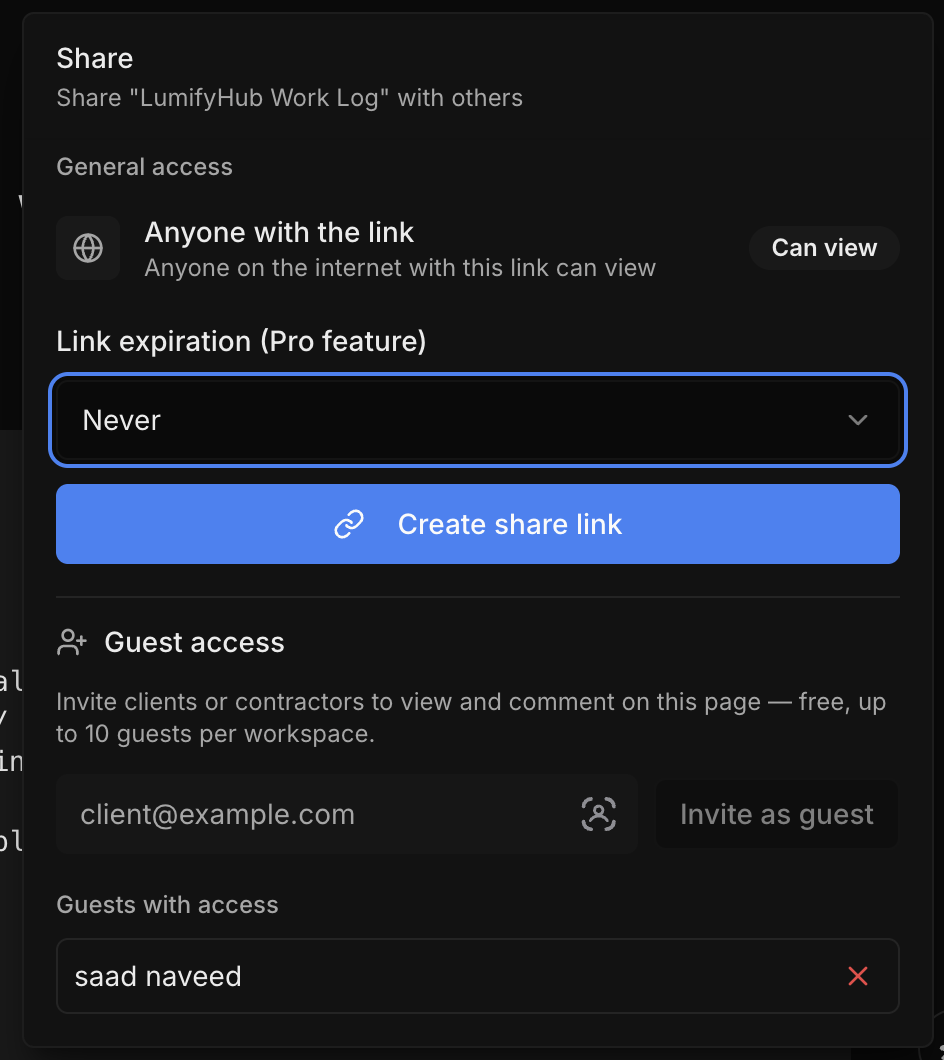
You can now invite guests to your workspace with scoped access, making it easier to collaborate with clients, contractors, or partners without giving them full team permissions. The new guest settings UI lets you clearly manage and review what each guest can see and do.
Key Benefits
- Invite-Only Access: Share project pages with external collaborators safely
- Granular Controls: Decide exactly which pages and resources guests can view or interact with
- Clear Oversight: Team settings UI provides a simple overview and management for all guest accounts